USB Stick Scams, you don't really want to fall for these, best advise is Don't pick up an unknown USB Stick, or put an unknown USB Stick into your computer it can cause all sorts of problems
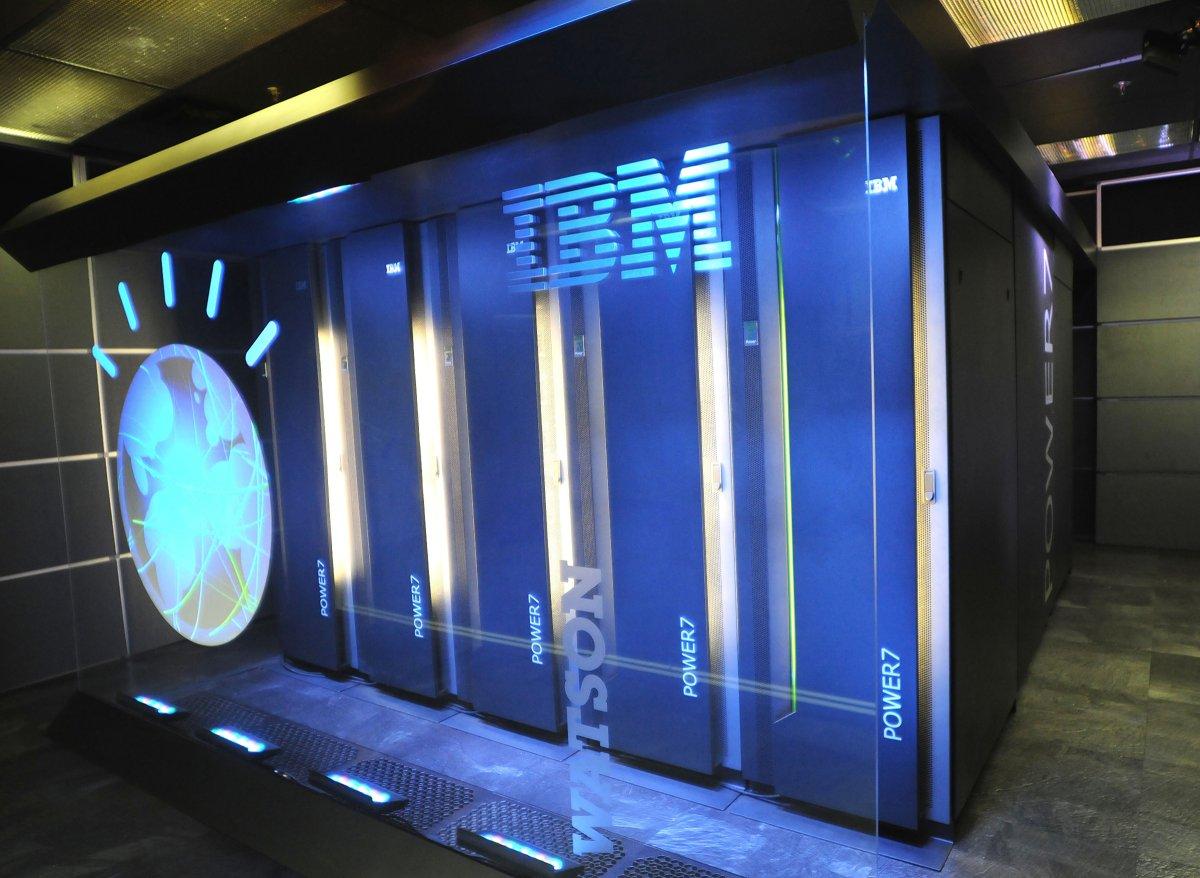
Should I Say Watson supercomputer? or Should I say Doctor Watson now, not to be confused with a character in Sherlock Holmes, recently a computer did what doctors failed to do, a computer identified Unknown illness a Japanese women had, this illness was a rare type of leukemia, the Japanese Doctors were Stumped, until Watson one of the Smallest Super computers the world built by IBM helped them, Watson is famous for going on the USA Quiz show Jeopardy 2011.
"After treatment for a woman suffering from leukemia proved ineffective, a team of Japanese doctors turned to IBM’s Watson for help, which was able to successfully determine that she actually suffered from a different, rare form of leukemia than the doctors had originally believed.
Watson managed to make its diagnosis after doctors from the University of Tokyo’s Institute of Medical Science was fed it the patient’s genetic data, which was then compared to information from 20 million oncological studies.
This analysis found a different diagnosis for the type of leukemia from which the patient suffered, and it suggested a different form of treatment, which proved far more effective than the original methods doctors had been using up to that point."
This is so cool people should the power of Watson more to solve problems that can change the world, this opens a window on to the future where computers help in the diagnosis of illnesses, but I hope Computer don't replace Doctors completely.
mote Information
Do you want to keep 360tb for life on a glass disc, backup entire libraries of data or more, with no damage over age and with thermal stability up to 1,000°C, well now you can, scientists at Southampton university have made a major step in making something that sounds like it came from science fiction into reality.
"The storage allows unprecedented properties including 360 TB/disc data capacity, thermal stability up to 1,000°C and virtually unlimited lifetime at room temperature (13.8 billion years at 190°C ) opening a new era of eternal data archiving. As a very stable and safe form of portable memory, the technology could be highly useful for organisations with big archives, such as national archives, museums and libraries, to preserve their information and records."
"Now, major documents from human history such as Universal Declaration of Human Rights (UDHR), Newton’s Opticks, Magna Carta and Kings James Bible, have been saved as digital copies that could survive the human race. A copy of the UDHR encoded to 5D data storage was recently presented to UNESCO by the ORC at the International Year of Light (IYL) closing ceremony in Mexico."
The documents were recorded using ultrafast laser, producing extremely short and intense pulses of light. The file is written in three layers of nanostructured dots separated by five micrometres (one millionth of a metre).
The self-assembled nanostructures change the way light travels through glass, modifying polarisation of light that can then be read by combination of optical microscope and a polariser, similar to that found in Polaroid sunglasses"
Professor Peter Kazansky, from the ORC, says: “It is thrilling to think that we have created the technology to preserve documents and information and store it in space for future generations. This technology can secure the last evidence of our civilisation: all we’ve learnt will not be forgotten.”
below is a video shows a disc being made using an laser
As people use more and more text speak these days parents, grandparents, teaches and other people working in kids or youth work should know what these terms means because kids are using them and as a person who have kids/youth in your charge you need to keep kids/youth safe
Below is the Top 50 Most Popular Text Terms found on netlingo, most of these on the whole seem safe, but there are some even on on this list that are maybe not safe
http://www.netlingo.com/top50/popular-text-terms.php
1. 2moro - Tomorrow
2. 2nite - Tonight
3. BRB - Be Right Back
4. BTW - By The Way -or- Bring The Wheelchair
5. B4N - Bye For Now
6. BCNU - Be Seeing You
7. BFF - Best Friends Forever -or- Best Friend's Funeral
8. CYA - Cover Your Ass -or- See Ya
9. DBEYR - Don't Believe Everything You Read
10. DILLIGAS - Do I Look Like I Give A Sh**
11. FUD - Fear, Uncertainty, and Disinformation
12. FWIW - For What It's Worth -or- Forgot Where I Was
13. GR8 - Great
14. ILY - I Love You
15. IMHO - In My Humble Opinion
16. IRL - In Real Life
17. ISO - In Search Of
18. J/K - Just Kidding
19. L8R - Later
20. LMAO - Laughing My Ass Off
21. LOL - Laughing Out Loud -or- Lots Of Love -or- Living On Lipitor
22. LYLAS - Love You Like A Sister
23. MHOTY - My Hat's Off To You
24. NIMBY - Not In My Back Yard
25. NP - No Problem -or- Nosy Parents
26. NUB - New person to a site or game
27. OIC - Oh, I See
28. OMG - Oh My God
29. OT - Off Topic
30. POV - Point Of View
31. RBTL - Read Between The Lines
32. ROTFLMAO - Rolling On The Floor Laughing My Ass Off
33. RT - Real Time -or- ReTweet
34. THX or TX or THKS - Thanks
35. SH - Sh** Happens
36. SITD - Still In The Dark
37. SOL - Sh** Out of Luck -or- Sooner Or Later
38. STBY - Sucks To Be You
39. SWAK - Sealed (or Sent) With A Kiss
40. TFH - Thread From Hell
41. RTM or RTFM - Read The Manual -or- Read The F***ing Manual
42. TLC - Tender Loving Care
43. TMI - Too Much Information
44. TTYL - Talk To You Later -or- Type To You Later
45. TYVM - Thank You Very Much
46. VBG - Very Big Grin
47. WEG - Wicked Evil Grin
48. WTF - What The F***
49. WYWH - Wish You Were Here
50. XOXO - Hugs and Kisses
most would say "what is wrong with these they seen harmless to me", yes, but there is also on NetLingo an extended list some of the terms on this list parents need to know as kids these days are using them, some of the terms are very shocking, check these terms out and check your kids phones and devices
http://www.netlingo.com/acronyms.php
Do you want to build your own laptop well now you can, two Singapore-based engineers made a open source laptop called the Novena this laptop can come already made in a case, or yuor can just buy the hardware and bulid your own case with laser cutting, 3d printers, etc.
On the Ben heck Show on Youtube, he built a laptop using the Novena open source laptop mother board, below is a series of videos of the build, on part 1 of the series there is a interview with the creators of the Novena enjoy
if you get a call like this from a person claiming they are from Microsoft or your ISP, they are scammers do not believe them all they want is money and access to your computer where they can download malware or viruses
computers and technology brings many useful things and knowledge, we can not have dreamed possible before the advent of modern technology such as computers, tablets, smartphones and the internet. you have a device in your pocket that can access all the information ever known, technology helps us to do our jobs, technology helps us talk to people 1000s of miles away in other counties, In the below video J John talks about technology and the use of technology in a Christian Context
Technology is everywhere more and more people are using it, we spend more time these days looking at screens on computers tablets and mobile phones, we can not get away from it, in a article on http://twloha.com/news/mental-benefits-technology-breaks the author states three main problems about technology.
Stress: Before technology and smartphones, when you left your place of work or learning, you most likely turned off the thoughts and emails related to it, too. Research shows we need mental breaks to refresh our minds and thoughts. In order to do so and leave our work behind, we need to shut off the continuous stresses of our work or classes. By staying constantly connected, we lose that boundary and end up taking it home with us. When you don’t give yourself time to be without emails, texts, and social media and to be present in the other parts of your life, you end up allowing yourself to stay in a constant state of stress.
Depression: Using computers, phones, social media, etc. late into the night, especially after using them all day, is shown to increase depressive thoughts and symptoms, as well as decrease one’s amount of healthy sleep. Bringing technology into the evening hours prevents us from encouraging our minds to be at ease and getting the sleep our bodies and minds need.
Inactivity: Spending too much time on electronic devices does not leave room for going outside, socializing, or exercising. However, exercise can reduce stress levels, it’s good for the body, and it promotes a better night’s sleep. So it’s no surprise that when we are constantly on a phone, tablet, or laptop, we are more likely to isolate ourselves rather than be active and out and about, which has far-reaching benefits for physical and mental health.
More and more people as using social media, talking to friends on a computer with no physical social interaction. we all need to spend physical time with people, it is in our DNA, it is how we were wired, we need people as John Donne puts it
No man is an island entire of itself; every man
is a piece of the continent, a part of the main;
if a clod be washed away by the sea, Europe
is the less, as well as if a promontory were, as
well as any manner of thy friends or of thine
own were; any man's death diminishes me,
because I am involved in mankind.
And therefore never send to know for whom
the bell tolls; it tolls for thee.
Pinterest:
20 million active users (70 million total users)
Social site that is all about discovery
Largest opportunities are in decor, crafts/diy, cooking, health, and fashion
Users are 17% male and 83% female
Twitter:
241 million active users (over 600 million total users)
micro blogging social site that limits posts to 140 characters
largest penetration in the US but spreading slowly and steadily
5,700 tweets happen every second
Facebook:
Social sharing site that has over 1 billion users worldwide
Largest opportunities communicating with consumers in a non-obtrusive way
Users share 1 million links every 20 minutes
Instagram:
200 million active users:
Social sharing site all around pictures and now 15 second videos
Many brands are participating through the use of hashtags and posting pictures consumers can relate to
Most followed brand is National Geographic
Google+:
540 million active users
Social network built by Google that allows for brands and users to build circles
Not as many brands active but the ones that are tend to be a good fit with a great following
25 – 35 year olds are most active
LinkedIn
300 Million users
Business oriented social networking site
also With technology children and teenagers can have access to things they should not be seeing such as porn etc, parents should find out what their children and teens are doing,
they should find out about computers and the internet, and educate your children to the dangers and security (i.e being careful what they share about them selves on line, viruses, computer fraud, etc) and put filters on their computers,
it also goes for computer games parents need to be responsible to check the games are suitable for the child they are buying it for and know what the computer game is about and themes it covers.
It is not just teenagers and children adults need also to be responsible in their technology using social media and internet usage, don't assume anything is secure, keep peoples Confidentiality don't share anything about other people, have Courtesy and respect when leaving comments so you are being a good witness, on the internet no body really knows who you are aware of computer fraud, crime, and scams, get educated, remember if it is too good to believe it is a con, don't be taken in
The Ten Commandments of computer ethics:-
Do not use a computer to harm others
Do not interfere with other people's computer work.
Do not snoop around in other people's computer files.
Do not use a computer to steal.
Do not use a computer to bear false witness
Do not copy or use proprietary software for which you have not paid.
Do not use other people's computer resources without authorization or proper compensation.
Do not appropriate other people's intellectual output.
Do think about the social consequences of the program you are writing or the system you are designing.
Do always use a computer in ways that ensure consideration and respect for your fellow humans.
good social media guidelines in a Christian context can be found at
• Would I be happy for my worst enemy to read this?
• Would I be happy with this on the front page of a national newspaper?
what your mother teaches you about being a good citizen in the real world goes, in the virtual world of the internet is it true,
also think and ask yourself when you post anything, is it helpful, am I being a good witness sharing it,
also think how much time you are taking on-line or using technology and ask yourself a question if you saw a friend taking this much time on-line would I be concerned about them, if the answer is yes maybe you need a break and downtime.
"Extensible Hypertext Markup Language (XHTML) is a family of XML
markup languages that mirror or extend versions of the widely used
Hypertext Markup Language (HTML), the language in which Web pages are
formulated.
XHTML was developed to make HTML more extensible and increase
interoperability with other data formats.[7] HTML 4 was ostensibly an
application of Standard Generalized Markup Language (SGML); however
the specification for SGML was complex, and neither web browsers nor
the HTML 4 Recommendation were fully conformant to it.[8] The XML
standard, approved in 1998, provided a simpler data format closer in
simplicity to HTML 4.[9] By shifting to an XML format, it was hoped
HTML would become compatible with common XML tools;[10] servers and
proxies would be able to transform content, as necessary, for
constrained devices such as mobile phones.[11] By using namespaces,
XHTML documents could provide extensibility by including fragments
from other XML-based languages such as Scalable Vector Graphics and
MathML.[12] Finally, the renewed work would provide an opportunity to
divide HTML into reusable components (XHTML Modularization) and clean
up untidy parts of the language.[13]
"Extensible Markup Language (XML) is a markup language that defines a
set of rules for encoding documents in a format which is both human-
readable and machine-readable. It is defined by the W3C's XML 1.0
Specification[2] and by several other related specifications,[3] all
of which are free open standards.[4]"
"PHP is a server-side scripting language designed for web development
but also used as a general-purpose programming language. As of January
2013, PHP was installed on more than 240 million websites (39% of
those sampled) and 2.1 million web servers.[4]Originally created by
Rasmus Lerdorf in 1994,[5] the reference implementation of PHP
(powered by the Zend Engine) is now produced by The PHP Group.[6]
While PHP originally stood for Personal Home Page,[5] it now stands
for PHP: Hypertext Preprocessor, which is a recursive backronym.[7]
PHP code can be simply mixed with HTML code, or it can be used in
combination with various templating engines and web frameworks. PHP
code is usually processed by a PHP interpreter, which is usually
implemented as a web server's native module or a Common Gateway
Interface (CGI) executable. After the PHP code is interpreted and
executed, the web server sends resulting output to its client, usually
in form of a part of the generated web page – for example, PHP code
can generate a web page's HTML code, an image, or some other data. PHP
has also evolved to include a command-line interface (CLI) capability
and can be used instandalone graphical applications"
PHP can be embed into HTML, but unlike HTML, PHP is a sever driven
language so you need a web server such as Apache and php engine to
make it work you can either put these on your computer, or get a web
host, see CMS section which gives information on LAMP or WAMP
“A content management system (CMS) is a computer
application that allows publishing, editing and modifying content,
organizing, deleting as well as maintenance from a central interface.
Such systems of content management provide procedures to” manage
workflow in a collaborative environment.[5] These procedures can be
manual steps or an automated cascade. CMSs have been available since
the late 1990s.
Both of these are free and can can be downloaded, but you need PHP,
MYSQL and Apache web server on your web host or on your own
computer/server. PHP (see php above), Mysql (database) and Apache are free and can
also be downloaded, but hard to set up if you want to set up your own
server, check out the information and links below
if you go the web host route these can be expensive because you can
not use a free web host because they do not give to access to the
server and are not WAMP or LAMP server compatible. there are lots of
web hosts available just Google web hosting (check if they are a WAMP
or LAMP compatible) and choose a web host in your budget range, you
usually pay monthly or yearly
These are free services and you get everything you need to get
started this is a good place to start, you can even use the blogging
platforms web pages, you get a domain name such as
http://wordpress.com/example in Wordpress, http://tumblr.com/example
in tumblr and http://Blogger.com/example in blogger, however if you
need a domain name such as example.com etc you need to pay, in
wordpress you also pay to have access to css
“HTML or HyperText Markup Language is the standard markup language used to create web pages. A web browser can read HTML files and compose them into
visible or audible web pages. The browser does not display the HTML tags, but uses them to interpret the content of the page. HTML describes the structure of a website
semantically along with cues for presentation, making it a markup language rather than a programming language.”
“Cascading Style Sheets (CSS) is a style sheet language used for describing the look and formatting of a document written in a markup language. While most often used to change the style of web pages and user interfaces written in HTML and XHTML, the language can be applied to any kind of XML document, including plain XML, SVG and XUL. Along with HTML and JavaScript, CSS is a cornerstone technology used by most websites to create visually engaging webpages, user interfaces for web applications, and user interfaces for many mobile applications.”
Tutorials you can use to learn CSS and how to use it in HTML
These can be used on widows and mac they can also be used on Android and ios devices such as phones and tablets, they are also good to use with notepad as it shows you what the code will look like as a web page, have a go at using all of them find the best one for you
Professional editors
These are very expensive and until you find out you like HTML these are not the best option to start off with
as you can see from the articles above the phone can bend but Apple has dismissed claims that its iPhone 6 Plus handsets have a design flaw that makes them susceptible to being warped, stating in the article by the register that
"With normal use a bend in iPhone is extremely rare and through our first six days of sale, a total of nine customers have contacted Apple with a bent iPhone 6 Plus," Cupertino told the Beeb. "As with any Apple product, if you have questions please contact Apple."
in a article by the bbc Chris Green, principal technology analyst at the advisory service Davies Murphy Group said this
"Even the most recent smartphones are not designed to be put in trouser pockets - front or back - where they are going to be under the most chassis strain. And this just illustrates the fact that the public's desire for manufacturers to strive for ever thinner and lighter devices means that we are getting ever more fragile devices.
Just casually sticking a £700 smartphone in your pocket is an increasingly reckless thing to do.
This is not an issue that Apple - or other phone companies - need to be compelled to respond to or fix. If anything this is a reflection of how people have started to use devices beyond what they were designed for,"
Oh really, people usually do carry their phones in their pockets how do you carry yours. the videos below shows the problem and why it is happening
from ssnapcase
from Unbox Therapy
so after seeing this information what do we do with it,
if you already have a iphone 6,
1. be careful what you do with it
2. invest in a plastic case for it
if you are thinking about buying one (please make note i am not saying don't buy one, you have to make your own choice)
1. do your own research, talk to people who have one already, look at news articles, don't go with or believe the type, think clearly what you are doing this is a very expensive investment, you want to make the right choice.
2. after doing your own research and you still want to buy one, follow above instructions
have you always wanted to build your own laptop, now here is your chance check out the video below
the laptop is powered from a raspberry pi b+, the latest raspberry pi on the market, the laptop comes in kit form with all the parts needs to build your own laptop.
the makers say "No soldering is required to build Pi-Top and a beginner should expect to be able to complete the kit in an evening".
Have you always wanted a large touch screen now you can with the TouchPico which Turns Any Surface Into A Touch Screen and at $379 introduction cost $499 retail cost its a fraction of the cost of a dedicated touch screen which could cost 1,000s of dollars, plus you even have a Android pc thrown into the package check out the video below.
Got a raspberry pi, you don't know what to do with, always missing the doorbell and visitors because you can not hear it or want to build a smart home, why don't you build a smart doorbell, DIYer Daniel Garden did using a pebbly watch and a Raspberry PI, the video below shows it in action.
have you ever been travelling somewhere by plane or another mode of transport and you lost your case or someone else lost your case, making you say what Homer Simpson is always saying "D'oh" and costing you money buying new clothes for your holiday, what a pain.
with this case that will be a thing of the past cool, it's a case with a GPS, which your smart phone can talk to it, and know where it is at all times.
this technology should be out very soon now and is made by Deutsche Telekom making travel easier for everyone, more on this subject check out the below websites
there are lots of people that want to con you and take your money in this world don't let them check out these scams and don’t get done by them, the golden rule to remember if it seems to good to be true it isn't.
check out these links for more cons and scams you should not get done by
if you ever wanted to be willy wonka or if you ever wanted to 3D print food and have $5,000 or $10,000 laying around doing nothing now is your chance, 3D Systems just brought out two 3D food printers Chef Jet and the Chef Jet Pro
with this system your can 3D print anything as chocolate or candy, all you have to do is 3D scan it, or have a 3D print file of it, which you can download from the internet, think about it 3D edible car, or anything else you can think about, you can print some very complex structures, which would be impossible to make otherwise. at the moment the printers are just aimed at the professional market but maybe they will release a home model soon
what if doctors in the future can use star trek like tricorder or other technology to help them diagnose illnesses, this sort of technology is not far away, that can talk to smart phones, a number if different sciencetists are working are working on a number of such systems check out the videos below
these sort of systems may help people in remote parts of the world gain medical help they need, check out the links below